Reducing barriers in a contact form experience

UX research will tell you that three fields are optimal for compelling users to fill out a form. The more complex a form looks at the outset—its perceived complexity—the less likely people are to fill it out. In the world of B2B marketing where buying processes are long and complex, it's often difficult to reduce the number of fields simply because these organization's marketing qualification process requires information like phone numbers and company names to release a lead into a sales queue. So how do you increase the likelihood of a user filling out a form while upholding the information capture requirements of a marketing department? I set about designing a solution to this problem by reducing the amount of barriers, setting adequate expectations, making it easy to interact with, and trying out some new human-centred tricks.

UX/UI Designer

Designed at Quarry

Aligning the form to match B2B user expectations

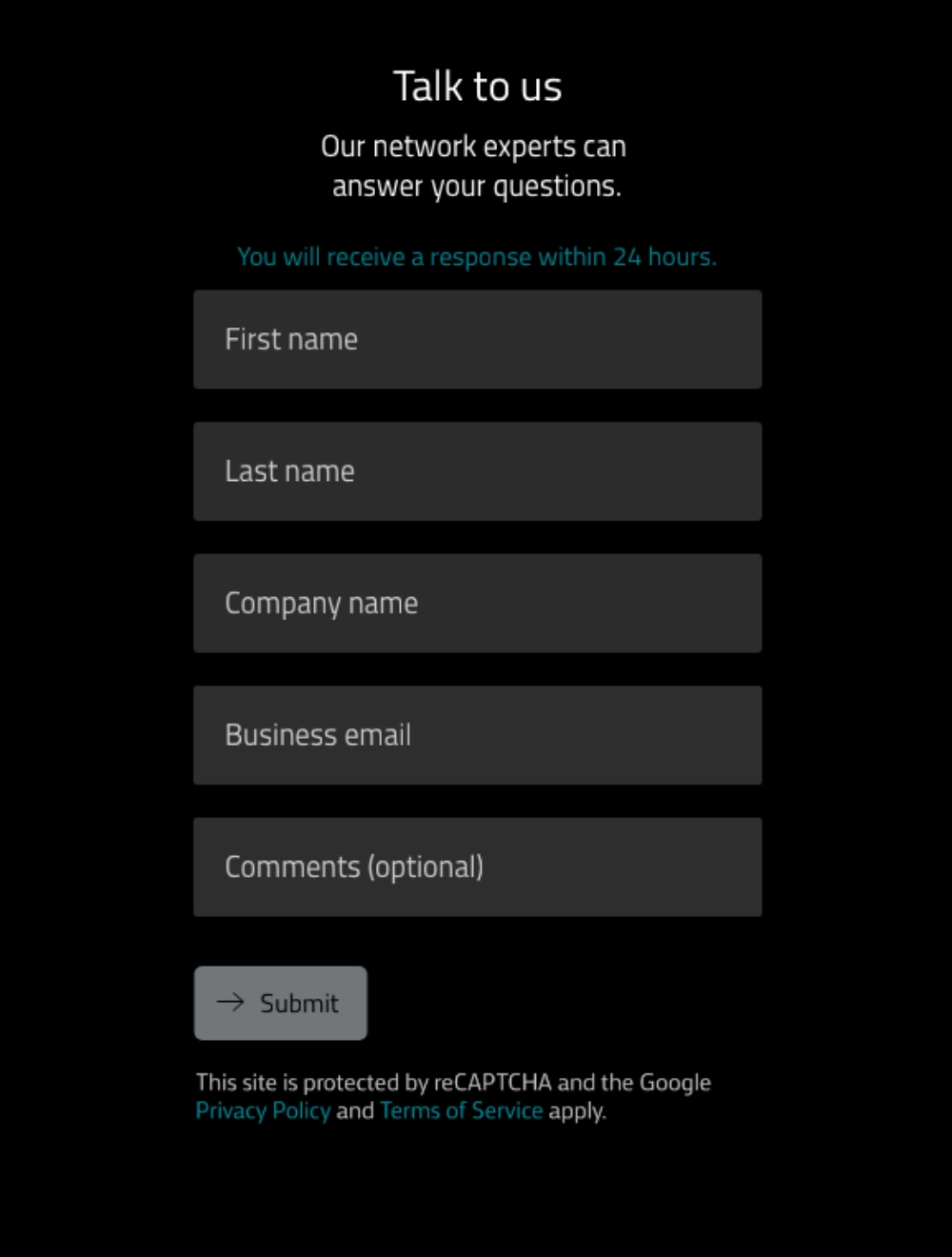
The new contact form experience provides succinct, scannable messaging, optimizes visuals to reduce perceived effort, and provides sufficient feedback to improve usability. In addition to table-stakes design guidelines like including placeholder text and labels above the fields, my high-level recommendations focused on ensuring the following experience that so many B2B organizations miss when designing their forms:

  • Tell people when they can expect a response
  • Ensure that the value of filling out the form is clear in order to encourage follow-through
  • Ask for information that's relevant to the user's task, requiring only a minimum effort to acquire the perceived value
  • Offer a contact form only in addition to email and telephone numbers, not as a replacement
  • Ensure the user has something to do next
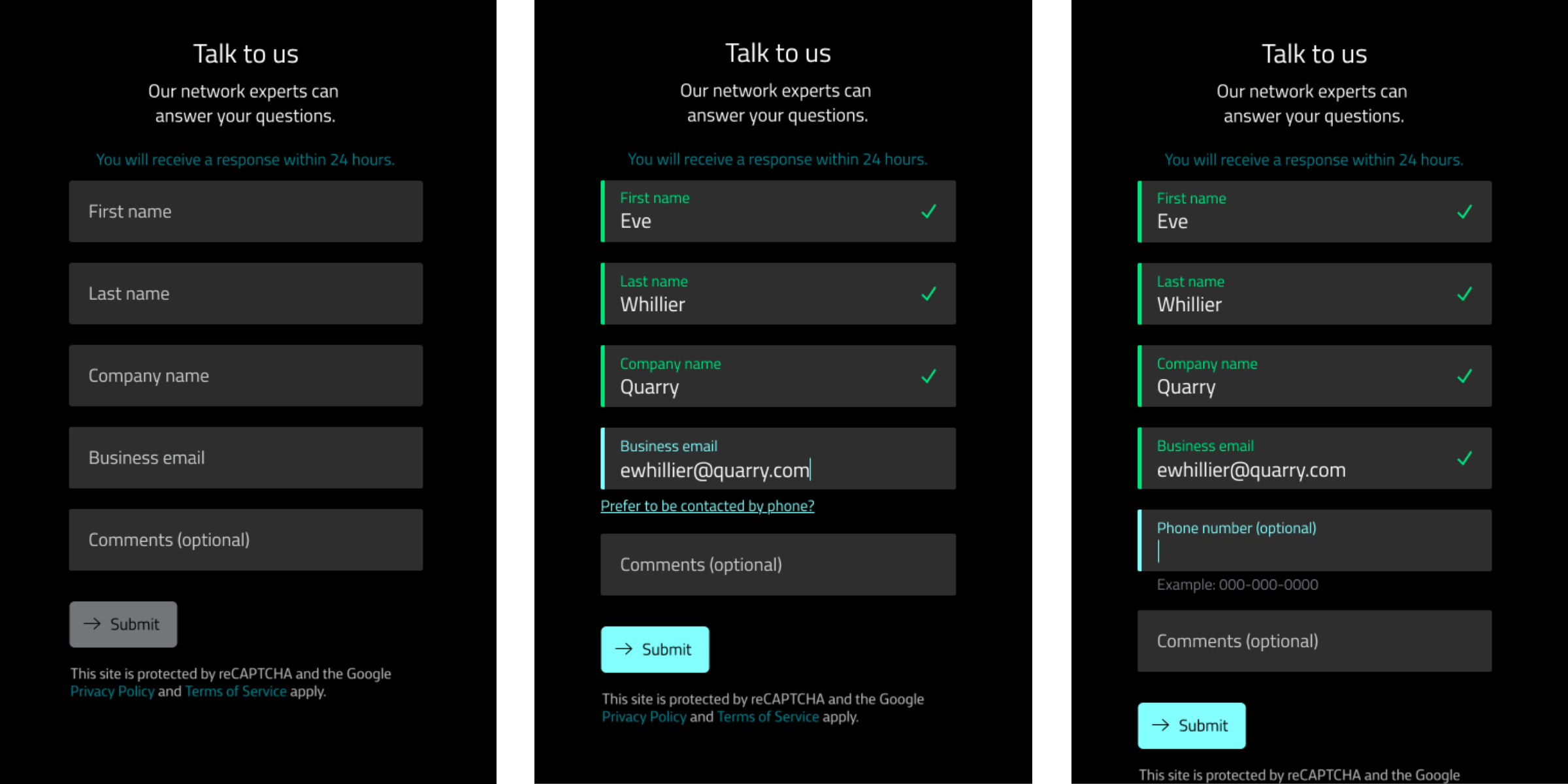
Progressively revealing optional fields

While combining first and last name fields was not an option in this case due to technological limitations, I designed a pattern for optional fields to be hidden when the user first sees the form, and pop up as prompts while their filling it out. In the case of the phone number, it is initially hidden, but once the user types in their email, a smooth animation enables a prompt below the field: "Prefer to be contacted by phone?" The user can click this prompt to reveal another field for the phone number. Approaching forms in this way reduces the perceived effort, shows the information in context, and relies on the Zeigarnik principle that compels people to complete a task they've already begun.
Ensuring form best practices are met

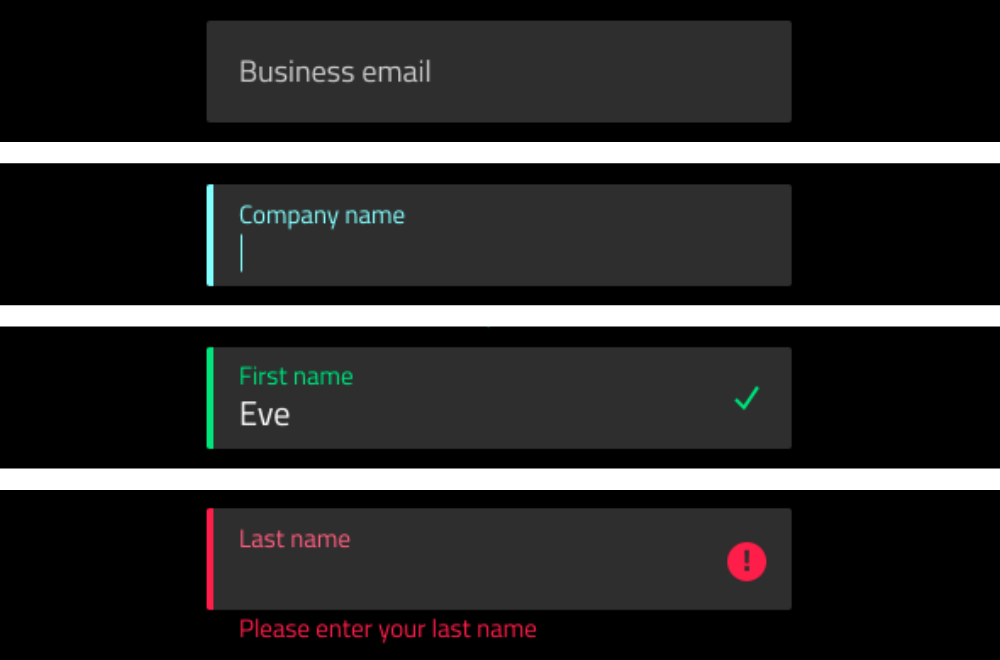
An initial review of WE's form revealed a number of best practices not being met. WE's new form included the following:

  • A single column of fields
  • Labels separate from placeholder text
  • Inline validation states
  • Inline error states
  • Helper text when an error is detected
  • Substantially different focus, complete, and error states that rely on more than just colour changes for people with differing visual abilities
Appending a form submission with
a request for more information

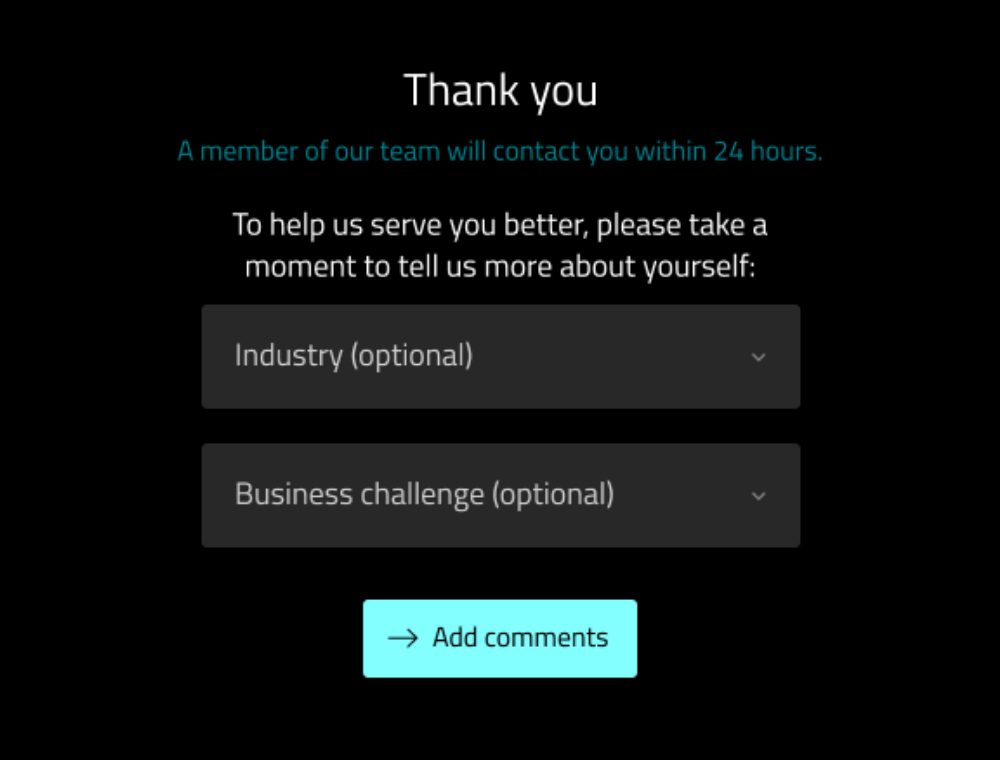
Once the form has been submitted, WE's form experience takes the user to a thank you page that asks for more optional information that will help their sales agents better prepare for the conversation. By including these fields on a second page, WE is less likely to lose leads because of an overwhelming form, and more likely to gain extra information about a prospect because of the extra value it may bring the user.
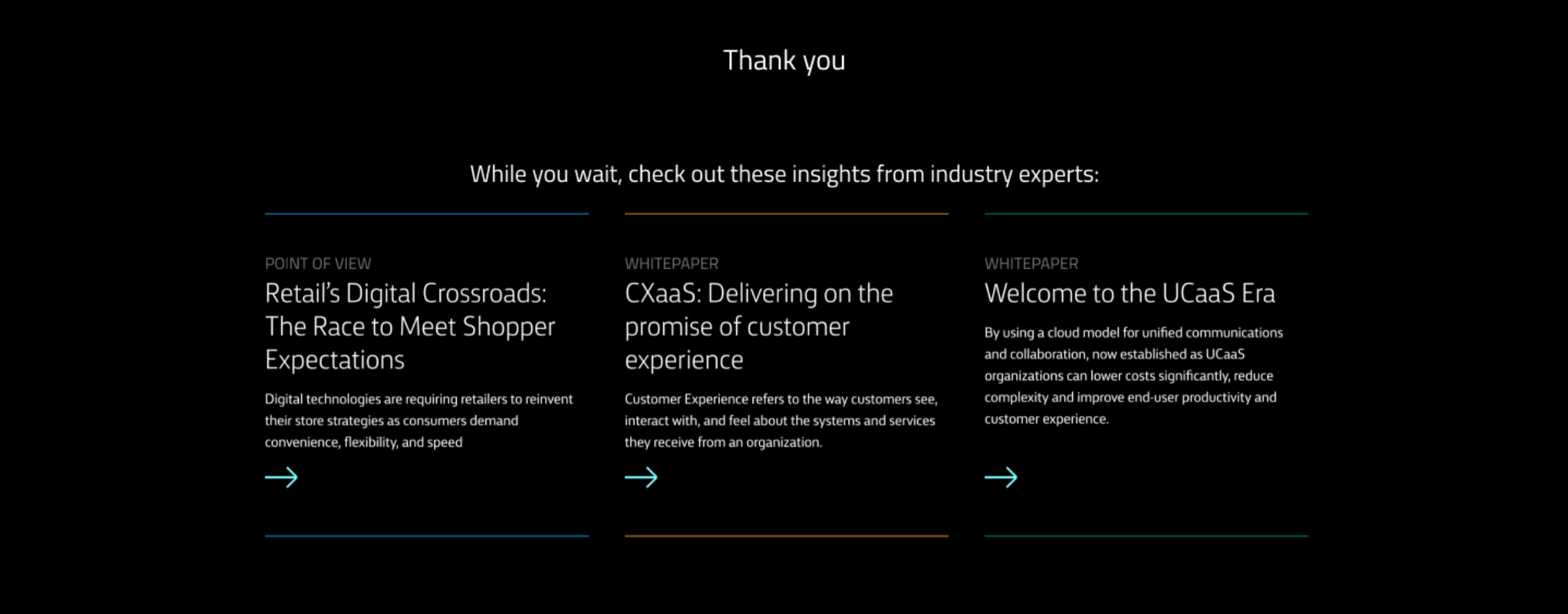
Giving the user something to do next

Once the user has filled out the form, multiple resources personalized to that user appear, allowing a continuous experience with WE's content should the user so choose.
Outcome

By designing and delivering a simple, comprehensive, well-designed calculation tool, prospects and customers of Chevron are able to complete their work faster, improve the durability of their vehicles, and ultimately reduce downtime for their business.

And in the process, Chevron demonstrates its trustworthiness and attention to customer care by providing experiences that make their customer's lives easier.

Win-win.

People-First
Website Design

Graebel came to us with the desire to update its flagship website to better reflect their strong global position in the industry and signal the exceptional experiences Graebel provides its client and their assignees worldwide everyday.

Website strategy and design

View

Calculating Freezepoints
in the Field

The Freezepoint Calculator helps vehicle operators understand when coolant maintenance is required by performing complex calculations in an easy-to-use interface.

Digital tool

View

Reducing Barriers
in a Contact Form

With UX best practices and marketing requirements at odds, Windstream Enterprise's new contact form design ensures that the form itself is not contributing to abandonment.

Contact form experience

View

Chevron Navigation Redesign

If a user can't find what they're looking for or perceive the experience as too complex, they'll find another site that's easier, meaning that Chevron was actively losing prospects because of their menu design. And that's where the problem-solving began: simplifying the information architecture that informs the primary navigation.

Navigation UX design

View

Nature informs the
triple bottom line

Learning from nature was the key to building a sustainability roadmap for Quarry.

Biomimicry investigation

View

eQo Green
Team

As Quarry's Green Team Lead, this self-led role involved leading a lean team of Qmates dedicated to and passionate about environmental sustainability in the pursuit of educating employees and advancing Quarry's processes towards sustainability.

View

Welcome

I am Eve

I am a graphic designer and front-end web developer who specializes in branding and digital design. I am a life-long learner and my current pursuit is in Biomimicry and its applications for graphic design.

For the sake of focus.

My design mantra, "For the sake of focus" is derived from a longer quote, "Minimalism is not subtraction for the sake of subtraction. Minimalism is subtraction for the sake of focus." (-unknown) It's easy to design for the purpose of arbitrarily making content pretty. I design for the purpose of honouring content by using design to enhance the focus of the message.

Interested in hiring me?
Shoot me an email: eve@whillier.com

View Resume

Design Excellence in Typography

This Mars calendar series was featured in the Spring '15 gallery of design work and chosen by a panel of judges to receive an award in Design Excellence.

View

Design Excellence in Innovation Space

Working on a multidisciplinary team, we researched and ideated through proof of concept a drone capable of restoring communication infrastructure over an area where a natural disaster has taken out communication. Our work was chosen to receive an award in Design Excellence.

View

Design Excellence in Illustration

Drawn, painted and then illustrated, this glass complex object was featured in the Spring '15 gallery of design work and chosen by a panel of judges to receive an award in Design Excellence.

View

Design Excellence in Letterform

Sketched, painted, and illustrated from scratch, Utopian was featured in the Fall '14 gallery of design work and chosen by a panel of judges to receive an award in Design Excellence.

View